The AI that Does Your Homework Before Every Meeting
Have you ever walked into a meeting only to find out that the person you’re meeting with lost a bid with your company last year, has two open proposals in the CRM, and had an article published in Portfolio three days ago about a major acquisition involving their company? I have. Many times. That’s why I built the AI skill that automatically solves this problem.
One of the most tedious yet most important tasks in preparing for business meetings is part of a manager’s job. Updating your LinkedIn profile, Googling the company, reviewing emails, browsing SharePoint, and checking the ERP system—if you do it properly, it takes 20–40 minutes per meeting. If you don’t, you’ll go into the meeting blind.
The meeting-prep-generator skill solves this problem: it does it automatically, before every meeting, in just 2–3 minutes—and it draws on sources that people rarely consult manually.
What exactly does the AI meeting planner do?
When you ask it to, the skill simultaneously accesses eight different data sources. It retrieves the meeting details from your Outlook calendar—who organized it, who’s invited, and the location—and immediately alerts you if there’s a conflict with another meeting in the same time slot.
It then goes through each external participant:
- Outlook email history — a summary of the last 3–5 emails
- Microsoft Teams chat — relevant internal messages about that person
- LinkedIn profile and company page — position, recent activity
- Google News — the latest news about the company and the person from the past 90 days
- Business Central ERP — Was the transaction invoiced? Are there any outstanding receivables?
- Jira — active projects, open support tickets
- SharePoint — shared documents, contracts, proposals
- Reddit and Portfolio forums — what do people who have worked with them say?
It’s not a chatbot, but infrastructure. It doesn’t think for me—it just handles the routine, administrative tasks that used to take up my time.
The meeting type determines the card's content
The skill does not assign the same card to every meeting. It automatically identifies the nature of the meeting based on the calendar item, the participants, and any description—and uses a different structure accordingly.
First introductory meeting
The focus is on common ground and suggested opening questions. What has this person posted on LinkedIn in the last 30 days? What is their company’s current strategy? How did we come into contact?
Contract negotiations
The focus is on the points of contention identified in SharePoint and the unresolved legal issues. It does not summarize the entire document—it simply highlights the issues that still need to be decided.
Recovering Lost Customers
What went wrong, what was the value of the lost business from BC, and what approach should we take to win it back? This is the kind of meeting where preparation matters most.
Returning status (internal employee)
When searching for internal colleagues, external search results are completely excluded. Instead, the system uses the colleague’s existing profile and email/Teams history—making the process faster and more relevant.
What types of plugs does it combine?
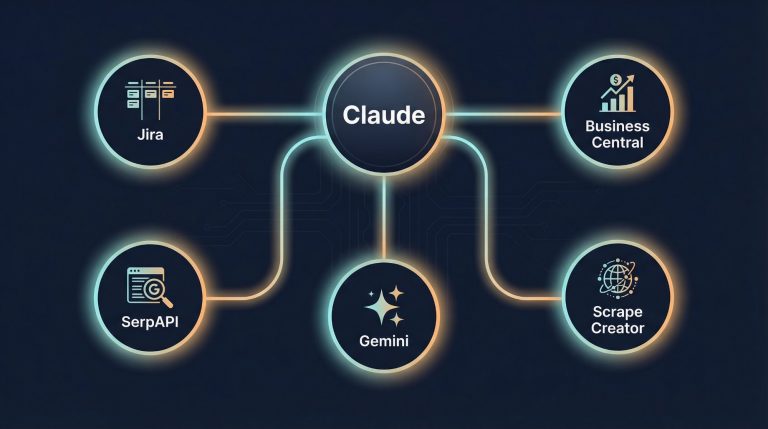
This is what makes the skill such an effective tool. It doesn't rely on a single data source, but combines them in real time:
- Microsoft 365 — Outlook Calendar, Email, Teams Chat, SharePoint
- Business Central ERP — Customer Status, Billing History, Accounts Receivable
- Atlassian Jira — active projects, support tickets
- Social Media Scraper — LinkedIn Profile and Company Data
- SerpApi Google News — real-time news from the past 90 days
- Web Search — Public opinion scan of Reddit and Portfolio forums
All of this runs in parallel. Empty sections are never included in the output—only those with actual content are displayed.
Assuming 5 to 8 external meetings per week, this amounts to a time savings of 2 to 4 hours per week. But the real value isn’t the time—it’s the facts, without which you’d be going into a meeting blind.
How easy is it to use?
As much as you can say in a single sentence.
“Look up my meeting on April 17 at 11 a.m.”
“What’s happening today?”
“Prepare for tomorrow’s Navigator meeting.”
The AI searches the calendar for the event, identifies the participants, and starts the search—without asking for any further details. You don’t need to know what data sources are in the background. All you need to know is when the meeting is.
Summary
The meeting-prep-generator skill is exactly the kind of AI application I love to write about: it’s not a chatbot, but infrastructure. After 23 years of business experience, I know that what sets the best negotiators apart isn’t luck—it’s preparation. This skill automates that preparation.
Related articles
- 7 custom AI connectors that save 15–20 hours of work per week — The meeting-prep skill is built on the infrastructure of the 7 MCP connectors
- Email Automation with Claude and Cloudflare — Another Connector in Practice: Saving 90 Minutes a Day
Frequently Asked Questions
What do you need to use the meeting-prep skill?
The skill runs on Claude AI and connects to existing Microsoft 365, Business Central ERP, Jira, and other connectors. No separate software installation is required—once the connectors are set up, the skill is ready to use immediately.
How much time do you save when preparing for a meeting?
Manually preparing for an important external meeting takes 20–40 minutes. This skill reduces that time to 2–3 minutes—and it draws on sources that people rarely check manually: ERP, Jira, Google News, and forums.
What data sources does the skill use?
From eight sources at once: Outlook Calendar, Outlook email, Microsoft Teams chat, SharePoint, Business Central ERP, Atlassian Jira, LinkedIn, and Google News. The public opinion scan also includes searches on Reddit and the Portfolio forum.
Are internal colleagues also conducting research?
No—for internal colleagues, external searches are automatically skipped. Instead, the system works based on the colleague’s existing profile and email/Teams history. It’s faster and more relevant.
What happens if there are no results in a data source?
The empty section simply does not appear on the card. If all sources are empty for a participant, the skill displays the message: “No digital history—the context is in your head. What would you like to think about before the meeting?”
How does the skill identify the type of meeting?
Based on the calendar item, the participants’ email domains, and any calendar description, the system automatically classifies the meeting as an initial meeting, a contract negotiation, a lost client, a follow-up, or a partner/business development meeting. Each type has a different card structure.